Add accounts your way
Scan an otpauth QR code, pick a QR image, paste a link, or import Google Authenticator migration QR codes when switching phones.

Keep your two-factor authentication codes together in a clear, private offline vault. Generate TOTP, HOTP, Steam, and mOTP verification codes on your Android device with encrypted Keystore protection.
Designed & developed by Poovarasan Vasudevan
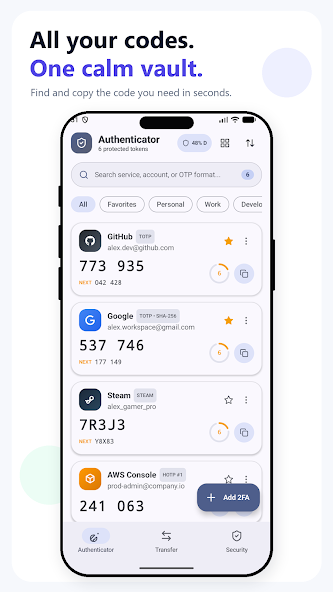
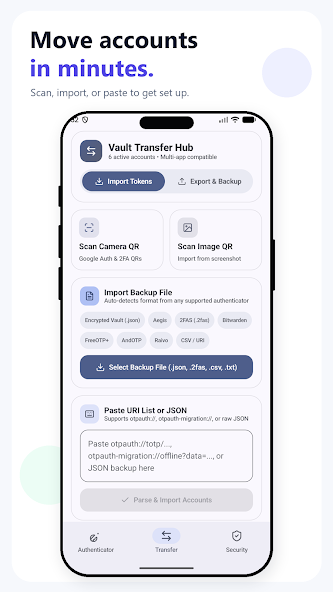
Explore what you can do with OTP Authenticator: 2FA Codes.
Scan an otpauth QR code, pick a QR image, paste a link, or import Google Authenticator migration QR codes when switching phones.
Secrets are encrypted using Android Keystore with PIN/biometric unlock, tap-to-reveal masking, screenshot blocking, and a built-in security audit.
Create password-protected encrypted vault backups, or import/export compatible JSON, otpauth URI, and CSV formats offline.
Screenshots from Google Play. Select any screenshot to enlarge.
Works completely offline without an online account or cloud sync. Keep your backup password safe.
Scan a 2FA QR code or import an existing authenticator backup.
Organize accounts with groups, favorites, search, and biometric lock.
Create an encrypted vault backup for safe device migration.
Jetpack Compose · Android Keystore · Biometric Auth · Encrypted Vault Backups
Discover OTP Authenticator: 2FA Codes on Google Play.